How to Make a D&D Character Portrait with AI
A few fields, a prompt and ChatGPT: your D&D character's portrait, ready for your sheet and token. Then monsters, maps, locations and items.
··6 min read
You have the character: the species, the class, the background, maybe a backstory too. What's missing is a face. On RollCamp the face works like this: you describe your character in a few fields, RollCamp writes the prompt, and ChatGPT draws the portrait.
The prompt is free, and you don't need a RollCamp account. For the image you need a ChatGPT account, and the free plan works: how many images it gives you a day is up to OpenAI.
What you need
- a ChatGPT account, free is fine;
- the Image prompts page;
- an idea of who your character is. Two lines are enough.
The portrait in four steps
1. Open Image prompts and pick Character.
2. Describe them, one field at a time. All of them are needed: the species and the class, picked from a menu, then the age, expression, face and build, and clothing and gear. "Where" is a hint of a background, not a scene.
3. Copy the prompt with "Copy prompt". You don't need to read it, but "Show the prompt" is there if you want to.
4. Paste it into ChatGPT and generate the image. "Open ChatGPT" opens a tab with the prompt already in the box: you just send it.
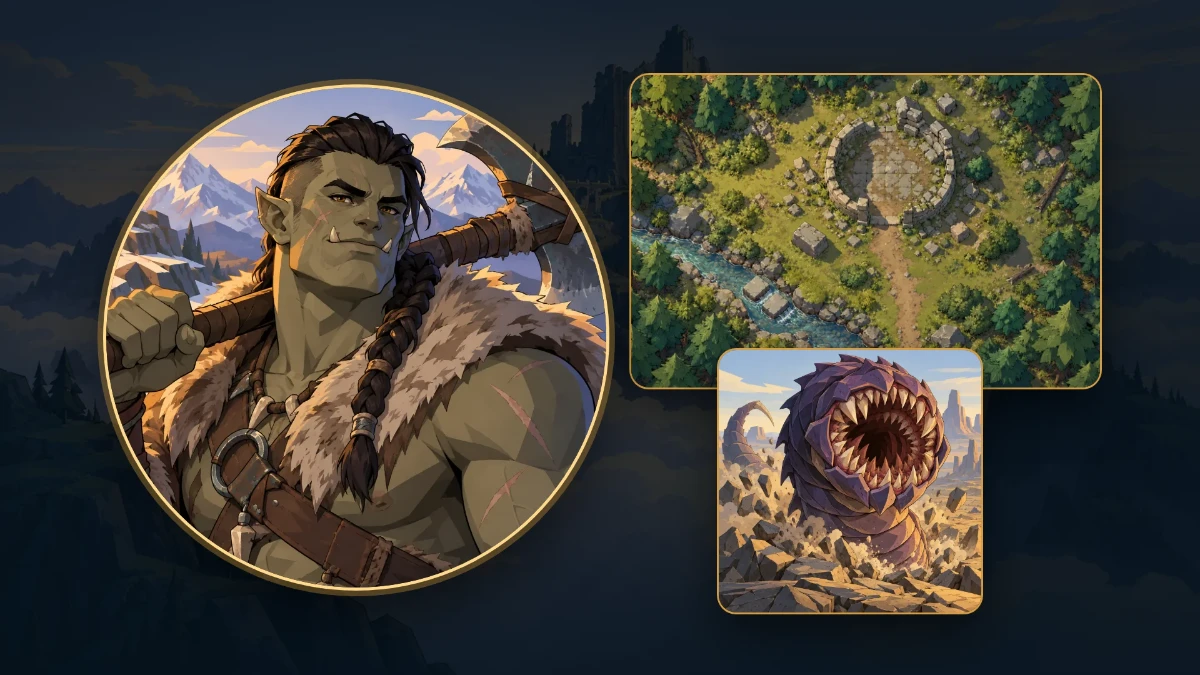
Here's our example, an orc barbarian:
| Field | What we wrote |
|---|---|
| Species | orc |
| Class | barbarian |
| Age | in his thirties |
| Expression | a confident half-smile |
| Face and build | broad-shouldered, a handsome face with a strong jaw, grey-green skin, short tusks, dark hair shaved at the sides into a long braid |
| Clothing and gear | a fur mantle over bare scarred shoulders, a greataxe resting on one shoulder |
| Where | a hint of the wilds: a windswept ridge and distant snowy peaks behind |
The portrait comes out square, with the face in the middle and nothing important near the edges: it's made to sit in your character's round avatar and in their token on the map, without cutting off the head.
How to describe your character
The prompt already knows the style, the light and the framing. Your job is to say what can be seen.
- Write what can be seen, not the backstory. "A scar across one eyebrow" works, "lost his brother in the war" doesn't.
- One telling detail beats ten generic ones: a spyglass on a strap, a worn holy symbol, a patched cloak.
- The expression changes everything: a half-smile, a tired look, a clenched jaw.
- Don't add technique words like realistic, detailed or oil painting: the prompt has its own style, and those words drag it toward painting and realistic faces.
- Write in English: the prompt comes out in English, and that's what ChatGPT reads best.
The portrait on RollCamp
Upload the image to the portrait field: in the character creator, on the sheet, or in the monster editor. And if you get there without an image, below the empty field there's "Don't have an image?": it opens the same form in a window, with the type already chosen, and after the copy it lets you upload the image without leaving the page.
From the sheet and the creator, the window arrives already filled in with what RollCamp knows about your character: the species, the class, what they're wearing and carrying in clothing and gear, and the Appearance from their Details in face and build. All that's left for you is the age, the expression and the background in "Where".
The same link is in the other image fields: the token, items, the map, the campaign background, the chapter and Scene covers, and the Archive.
If the result is off
- Change one thing and try again. After two tries, change the subject or the framing instead of pushing.
- Maps, books and compasses fill up with writing. If one is in the scene, add "only drawn terrain" for a map, "sketch lines only" for a book, "plain rings with notches only" for a compass.
- For the same character in several poses, attach an image that already worked to ChatGPT and add the line you'll find in the page's tips to the prompt. Only attach your own images.
- Common fantasy is fine: dragons, vampires, elves, ruins. The prompt only steers away from named characters, logos and emblems from other games, films and books.
Not just portraits
The page has four more types, each with its own format and fields.
Monster
For a monster's portrait and token. The golden rule: describe it, don't name it. Our example is a purple worm, but its name isn't in the prompt: what it looks like is.
| Field | What we wrote |
|---|---|
| The creature | a colossal burrowing worm with a thick segmented body armored in overlapping deep purple plates, bursting up out of cracked rock; a huge round maw ringed with rows of triangular teeth, wide open; no eyes; the tip of its tail with a long venomous stinger curls up out of the ground farther back |
| Size | Gargantuan |
| Where it lives | a barren plain of broken rock with a few angular mesas under a pale sky |
Map
A map seen from above, with no grid: RollCamp draws the grid. Choose how many squares you want on the long side; a multiple of 3 gives square cells.
| Field | What we wrote |
|---|---|
| The place | the ruins of a small stone watchtower in a pine forest clearing: the round broken base of the tower with one doorway and scattered fallen blocks, a narrow stream crossing the lower left corner with two flat stepping stones, a dirt path entering from the bottom edge, dense trees around the edges and a few bushes for cover |
| Squares across | 30 |
| Light | Day |
Location
A wide image, for the campaign background (subject in the middle) or for a chapter or Scene cover (subject on one side, because the title goes on the other).
| Field | What we wrote |
|---|---|
| Where it goes | Cover |
| Where and when | the common room of a crowded roadside tavern at night, heavy timber beams, a big stone hearth, rain against the small windows |
| What happens | a hooded stranger sitting alone at a corner table while the other patrons keep their distance |
| The subject is on the | Right |
| The light | warm hearth light from the right, cool blue-violet shade from the rainy windows on the left |
Item
An item to show at the table: a treasure, a relic, a clue. Common, on a neutral background, or magic, on a background in its rarity's color, like the magic items in the Compendium. If you need it without a background, open the image in ChatGPT and use "Remove background".
| Field | What we wrote |
|---|---|
| The item | a short wand of pale twisted wood capped with a cracked sapphire, frost crystals creeping along its length |
| What kind of item | Magic |
| Rarity | Rare |
Questions
- Is it really free? The prompt is, and you don't need a RollCamp account. ChatGPT makes the image, and it needs an account: the free plan generates images, but how many is up to OpenAI.
- Can I use another generator? The prompt is just text, so you can paste it anywhere. We test it in ChatGPT, and that's where we know how it turns out.
- Are the images mine? For your table, yes: they're yours to use for your characters, maps and sessions. If you plan to sell them or publish them as your own work, read OpenAI's terms first.
Try it now
Open Image prompts, describe your character and copy the prompt. Five minutes from now, they'll have a face.
Keep reading